Showing posts with label Android. Show all posts

Sunday, November 26, 2017

Geogian diaspora

This month a friend and I looked into the results of Recognizing Speech on Android.

In 2014 we created open source libraries and tools to facilitate usage of the Georgian language by Georgian speakers. One of these tools was Gismet, an Android application which can be used by Georgian speakers to train their Android smartphones to recognize their speech using PocketSphinx. The software was made freely available to the public and also open source on GitHub.


Since 2014 over 1,000 users have used the application to train the default language model to their voices. The location of the recordings is determined via GPS technology, and informed consent for the anonymous analysis of their voices is required as part of the software installation process.


Georgian diaspora
  • Red: Android location with < 100 accuracy range
  • Blue: IP geolocation


georgia
Georgian Diaspora, shown by GPS location of anonymous recordings.


The resulting datasets of anonymous elicited training recordings is similar to datasets obtained in an experimental setting. Below are a couple of spectrograms from the anonymous training recordings.


georgia

Specrogram of "რა ტემპერატურაა დღეს?" with careful yet natural prosody.

georgia
Specrogram of "რა ტემპერატურაა დღეს?" with audience-less prosody.

Wednesday, August 20, 2014

Recognizing Speech on Android

Tonight I'll be giving a talk at Android Montreal. In this talk I’ll show you how to use speech recognition in your own Android apps.

The talk will have something for both beginner and advanced Android devs, namely I will show two ways to do speech recognition: the easy way (using the built-in RecognizerIntent for the user’s language) and the hard way (building a recognizer which wraps existing open source libraries if the built-in RecognizerIntent can’t handle the user’s language).


While I was in Batumi my friends and I built an app so that Kartuli users (code) (slides) (installer) could train their Androids to recognize SMS messages and web searches.


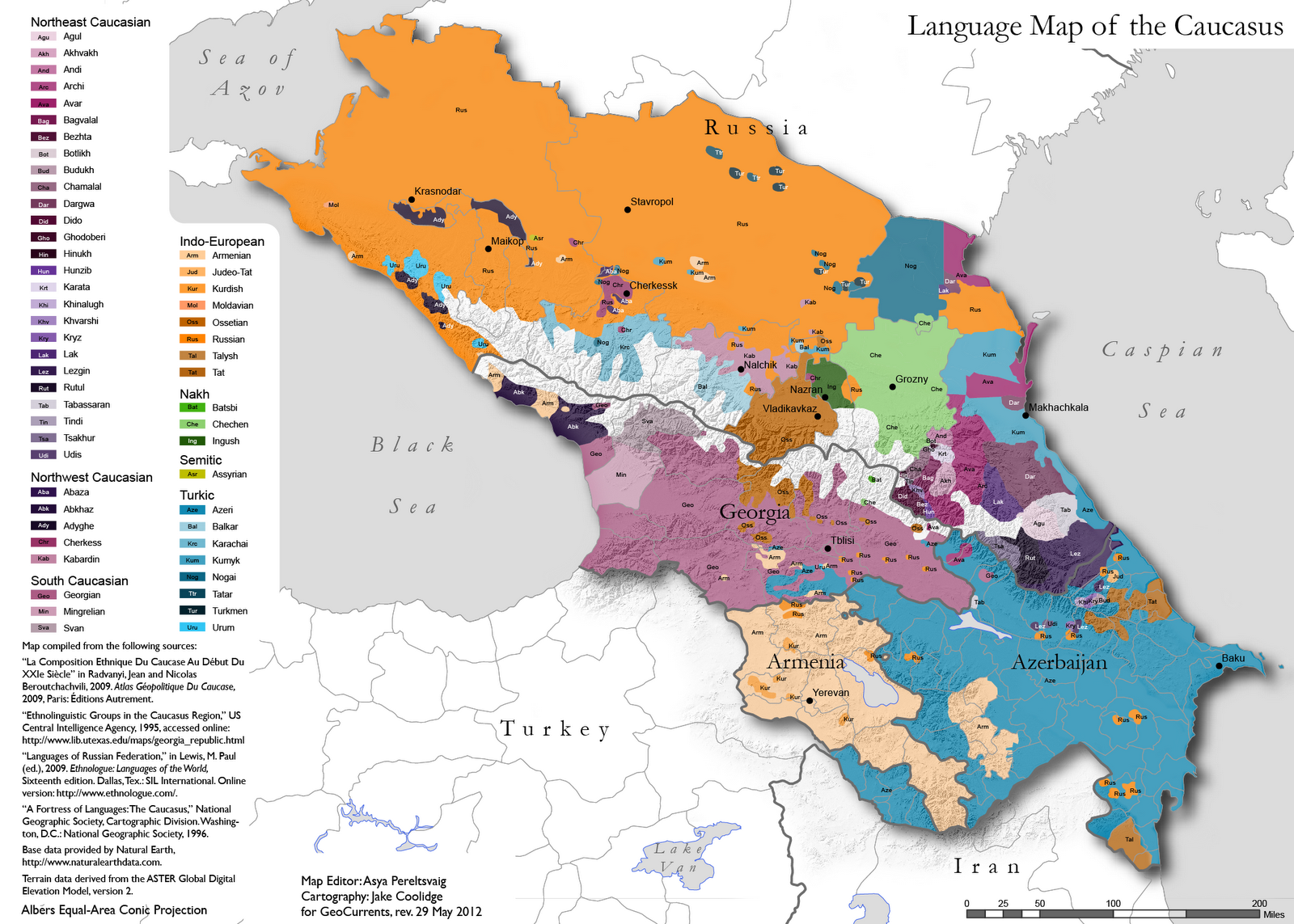
Recognizing Kartuli is one of the cases where you can’t use the built-in recognizer. Kartuli spoken by only 4 million people in the country of Georgia: that is roughly the population of Montreal and surrounding areas.

CaucasusLayout_rev.png

The talk will start with a demo of our Kartuli trainer app to set the context for the talk, and then dig into the code and Android concepts under the demo.
  • * How to use the default system recognizer’s results in your own Android projects,
  • * How to use the NDK in your projects,
  • * How to use PocketSphinx (a lightweight recognizer library written in C) on Android

Live broadcast on YouTube:

http://youtu.be/XNIS0hTzGIA

Tuesday, February 26, 2013

Up and running with Android

This week I'll be giving a workshop:

Up and Running with Android

In this workshop we will go from installing Eclipse to making your Android read to you, listen to what you say, and then take action on what you say.

The tutorial is based on our Cloud Robotics hackaton project to command our Roogle bot to move around.

Github codebase:

https://github.com/AndroidMontreal/UpAndRunningWithAndroid/tree/master/Tutorial

To step through the tutorial, start off with #1 in the issue tracker:


Friday, March 16, 2012

Cloud Robotics Hackathon: Darwin-OP, an Ubuntu Linux Machine with legs!

Do you ever sit your couch and realize you need to go to your computer to do something on your server, you need a bigger screen than your Android, but you don't feel like getting up and going to your computer?

Here's a solution: Darwin-OP!


Darwin is a little humanoid robot, about all he is good at right now is playing soccer, but he is indeed a linux machine with legs. With a few bash scripts, or an Android which pings him, you can easily program him to walk over to your couch, let you plug in a screen and keyboard and you've got yourself a "remote head" with an all new meaning of the term.


At the Cloud Robotics Hacakthon in Montreal I had the good luck to meet a Darwin-OP in person, and even SSH into him and poke around. I couldn't do much more than that because he was running Ubuntu 9.10, and we couldn't find any mirrors serving up packages so we didn't have time to update him so we could install what we had been planning on installing including Mercurial, ROS, Festival or Sphinx etc. In the end we settled with a very simple goal, hacking his demo code to make him play musical chairs with our other robot, a little DFRover.


Darwin's code is on SourceForge, and it might even be possible to simulate him. At the moment he has modules for Motor and Vision (crucial when playing soccer).


Link to what we got done during our hackathon project:

https://github.com/cesine/roogle-darwin/issues?q=is%3Aissue+is%3Aclosed+label%3AMilestone-Hackathon

Link to our Github project and codebase:

https://github.com/cesine/roogle-darwin

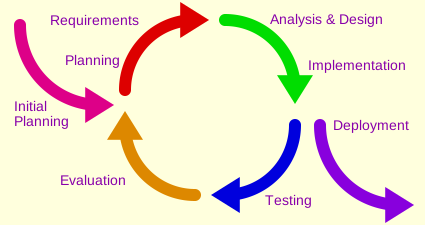
The fieldlinguist - programmer parallel

A fieldlinguist goes out in the field and asks their informant questions. They return to homebase, build a model to reflect their session with the informant, return to the field a few weeks/days later,  ask the informant some of the same questions, and questions which build upon the model. The informant says "No, thats not how it works, it works like this."

The fieldlinguist goes back to homebase, researches similar constructions, rebuilds the model and returns to the informant, the informant says "No, I can say xx is true, but not really not xxx." And the cycle continues until the model converges...

Sound familiar?

Résultat de recherche d'images pour "iterative software development"

Tuesday, November 1, 2011

Bootstrapping Android Best Practices

Today I'll be giving a talk at Android Montreal:

Bootstrapping Android Best Practices


Like human language, programming languages are
  • One part syntax, 
  • One part vocabulary, and 
  • One part culture/socio-linguistics. 
Too often when learning a new language we focus on syntax and vocabulary, but not enough on culture/best practices. Sure in our courses we might learn that the French like wine and baguettes, and wear berets, but on the ground its not really that simple (n'est pas?). In this tutorial we "immerse" ourselves in the culture of two projects to simultaneously learn syntax, vocab and best practices for getting things done in Android Development.

We have selected a few repositories, 2 which show best practices, and 2 pairs of pidgins vs best practices which show not fully formed Android development.


Beginner-Friendly Best Practice Learning Grounds

MyTracks

Replica Island

Pidgins vs. Best Practices Pairs

Two page-curl repos

Three Blogger clients

Google IO Sched 2011
  • Advanced: using fragments for phones and tablets (warning: this creates many layers of abstraction so its hard to navigate as a beginner) 
If you want to use MyTracks you will need to follow their steps to set up your Eclipse environment, and update your AVD manager.

Monday, October 31, 2011

Recording voice, eye-gaze and touch on Android tablets

We presented our codebase which records voice, eye gaze and touch on Android tablets at the Academy of Aphasia annual meeting a few weeks ago. Our poster is here


Our Architecture and Results

2011      (with A. Marquis and A. Achim) "Aphasia Assessment on Android: recording voice, eye-gaze and touch for the BAT," Academy of Aphasia 49th Annual Meeting, Montréal.

I wanted to make it as easy as possible to reuse our code so I made a couple of videos to walk through the project and explain it in non-technical terms.

The first video talkes about the Android side which simply collects the video, audio and touch data.


The second video talks about the "server side" where a lot of the open source repositories are used and the really exciting data extraction and analysis takes place.


The third video gives an overview of how to get the code.


The fourth video is a lot longer than the others because it shows how you can adapt the project to your own experiment and also how you can use GitHub to manage your own projects (good for long distance collaboration and delegating among team members).


The last video is a quick demo of the touch data we got for the stimulus "shin" for our subjects, with a lively rendition of "Parole, Parole" :)

Wednesday, September 7, 2011

Watchmes for AuBlog

I made some quick-n-dirty Watchmes

How to use AuBlog for blogging via typing


How to user AuBlog for blogging via dictations


The machine transcriptions are hilarious, and not very useful. AuBlog uses an Open Source machine transcription software (Sphinx). It needs to be trained to your "iLanguage" (vocabulary) to return quality results...

Wednesday, August 31, 2011

App Stats 20 days - Conclusion: Calling for Malay localizers :)

Let's take a look at my Android Market stats during open beta testing for Iteration I Aug 9-29 : User Interface

I have a total of 15 active users according to the Android Market, most of the users have either Android 2.2 (Froyo) or 2.3.3 (Gingerbread).

Android versions:

1. 2.22,08478.17%
2. 2.3.338114.29%
3. 3.1672.51%
4. 2.2.1501.88%
5. 3.0.1431.61%
6. 2.2.2200.75%
7. 2.3.4130.49%
8. 3.270.26%
9. (not set)10.04%


Total active installs : 15


Naturally I have had installs in Canada and the US, but 50% of my user base is in Indonesia and Malaysia  (probably my friends from Grad school) although I'm not sure how they found out about it, since I only told a couple of people that I knew that had Androids. There were also some users from Israel,  Austria, Sweden, India, Lebanon and the UK. How they found AuBlog and why they downloaded it I can't guess :)


1
Malaysia
26.7% (4)
2
Indonesia
26.7% (4)
3
United States
13.3% (2)
4
Canada
13.3% (2)
5
United Kingdom
6.7% (1)
6      
Austria
6.7% (1)
7
 India
6.7% (1)

The most important thing for me was to find out what kinds of devices I should target. I have tested my app with an HTC Desire (2.2),  Viewsonic Gtab (2.3.3) and a Motorola Xoom (3.1) all of which have different user experience with my app.


1
Samsung Galaxy Mini

2
Samsung Galaxy Tab 10.1

3
Samsung Galaxy S2

4
HTC Thunderbolt

5
HTC Wildfire S

6
LG Optimus One

7
Samsung Galaxy Fit

8
HTC Desire

9
Samsung Galaxy S

10    
HTC Sensation 4G


Device Testing

The HTC Desire : my everyday device.

Audio
Bluetooth works seamlessly with Aublog. This is fortunate, as this is the device I go biking with. The audio is also a much better quality using the bluetooth although it is still only 8000 hz sample rate, yielding only 4000hz sample rate which is not usable for phonetic analysis. What a 4000 hz sample rate means is that high frequency noise like the white noise in the bursts and frication of stops, fricatives and affricates is not captured.

Visual
On the visual side of things, the Javascript in the Drafts Tree consistently renders the tree and the JavaScript in the Edit Entry page also consistently saves state when I rotate the device. On the other hand, the buttons in the WebView are quite ugly, by default.


The ViewSonic GTab

Audio
It doesn't work with Bluetooth, despite having bluetooth, and successfully pairing with my bluetooth headset. It is perhaps due to a lack of a telephony system. In order to play and record audio through bluetooth, the app must actually route the audio through the telephony system in earlier versions of Android. So the fact that Bluetooth works on the HTC Desire, maybe due to the fact that it is 2.2, or that it is a phone. The Bluetooth API underwent a lot of improvements in 3.0 and beyond so hopefully it will work more consistently on the other devices. On the other hand, Android 2.3 and above allows for wide band recordings of 16,000 hz sample rate which yields a much better quality and is useable for phonetic analysis as the range needed for human speech sounds is below 8000 hz.

Visual
On the visual side of things the large screen size is fun for using the Drafts Tree! While testing I realized I started using the titles in the nodes unconsciously to document the branching test scenarios for each feature and sequence of  user actions in AuBlog. It serves as a pretty quick tree generator, especially for nodes with small labels. I was planning on repackaging it into a tree drawing app for linguists, or tree thinkers.  The WebView buttons are also quite visually pleasing, by default.

A question for the tablet users: can you record and hear audio with your paired bluetooth headset when you enable it in AuBlog?

The Motorola Xoom

Audio
The bluetooth and the audio on the Xoom has the same story as the GTab, no bluetooth but surprisingly good quality with the built in mic.

Visual
The Xoom was an interesting visual surprise for AuBlog. First of all, after testing heavily on the HTC, and once and a while on the GTab I didn't expect the Xoom to present such an unusable user experience. There are no hardware buttons on the Xoom, the buttons are created by the software. Moreover, there is no Menu button by default. Instead, menu items are rendered in "the Action Bar" if the app targets SDK 11, using the same underlying code. However, despite targeting SDK 11, and using best practices for menu coding, the menu didn't show up on the Xoom (probably because there are just words as menu items, not icons). To have the menu show up I changed the target to SDK 10, and now the software menu appears. The next problem with the XOOM has to do with the Drafts Tree. The drafts tree is generated when the user clicks on Drafts. The Activity calls the WebView with the static HTML page, and the HTML page loads the JSON (the tree).  By initializing the tree only after the page has loaded, and the JSON has finished exporting, the tree loads properly on the HTC Desire, and also on the GTab, but not on the Xoom. At first I thought it might be due to having 2 cores (one core might be still writing the JSON to file, while the other is loading the JSON into the WebView, but the GTab also has two cores. It may also have to do with having a new WebView version. A question for the testers with Android 3.0 and up, does the Drafts tree load?

In future iterations (once I'm out of the prototyping stage and the architecture has stabilized) I was also planning on localizing AuBlog for another language to put all the mechanisms in place, my candidate languages were French (since I live in Montreal) and Inuktitut (since my informants might tell their friends about it), but it seems like Malay could be fun too since its 50% of my current users :) That is not for a few more iterations, I will wait until the architecture has stabilized further.

Architecture Growth
Itteration I Graphical User Interface : v1.0 - 4 Months
Standard Activities + WebViews for graphically interesting User Interface + Settings for persistant variables and user preferences

Most of the development time so far has been devoted to reconciling the interest of a visually pleasing user interface with maintaing state and not loosing user's entries while they type and rotate the screen. It seems like it should not be such a complex operation, but rotating the screen "destroys" and recreates the activity. Since the user is typing in a webview the Javascript interface has to save the state down to the activity in order to use the built-in state saving mechanisms. Nothing is more frustrating than loosing what you have just entered because you shifted in your chair and the screen rotated. On the other hand rotating the screen is crucial for a good user experience: some times you want to read the entry in wide screen, and then rotate to edit in portrait with the keyboard on the bottom of the screen. The user interface uses a couple of open source JavaScript libraries to make the drafts tree interactive (JIT) and the blog editing WYSIWYG (MarkItUp).

Iteration II Background Services: v1.1 - 20 days
Standard Activities  + WebViews for graphically interesting User Interface + + Settings for persistant variables and user preferences + Recording and transcription server interfacing refactored into Services + Broadcasts between modules

Audio Management Services and the transcription server architecture (Node.js and PocketSphinx) was surprisingly straightforward to set up, and also the most important core of AuBlog's mission. In this iteration AuBlog supports 3 audio configurations: Bluetooth for wire-free dictation, earphones+mic for private dictation, and built-in mic and speakers for default dictation. AuBlog also supports a variety of internet connection preferences, from transcription only over Wifi, to transfers over 3G for x file sizes. In my experience dictations are between 2-4 minutes long, and result in really small files (10-15KB) so its worthwhile to send them for transcription over a 3G connection while I'm biking. I made it so that its completely configurable and users can decide what they want to automatically transcribe. I generally only send the lowest daughter on a branch for transcription since the others are drafts, I prefer to re-listen to them and reformulate them until I'm satisfied.


Iteration III Voice User Interface & Widget : v1.2 - (3 Months)
A homescreen widget for "eyes-free" bike blogging. This will encourage refactoring the code into a central "brain" which issues intents to the other components.  This will also be an interesting challenge to make it as "eyes-free" as possible and set up/adopt architecture to use Google Voice to recognize app commands
"New Entry"
"Play/Read Mother Node"
"Play/Read/Record Sister Node"
"Delete Entry"
"New Daughter"
"Stop recording"
etc

After spending so much precious dev time making sure the graphical user interface's javascript libraries is functional on an Android device, I remembered that I never really wanted a visual user interface; I wanted an "eyes-free" (meaning language only) interface. So, at this point the GUI is functional, and it will stay as it is unless there are some bugs which affect its functionality. I would love to auto-resize the nodes to fit the text but that would require a lot more dev time. I'm excited to start Iteration III, the part of the app that really interests me and is the part I can contribute to most: the VUI (voice user interface). I expect this will take me more time than Iteration II, which only took 20 days. It all depends on the existing open source modules I find and how well they integrate with Android. 

Wednesday, August 10, 2011

My first published app!

I published my first app yesterday on the market, it's called AuBlog.

Code https://github.com/cesine/Aublog


It's designed to let me blog while biking. I figured some others might be interested too so I put it on the market. I didn't advertise anywhere, I'll post about the organic statistics as they come in.
Posted using my Android

Sunday, May 22, 2011

My Gtablet goes Gingerbread!

Thanks to installing the sample speech recognition service in the android sdk on my gTablet (which was running a hacked version of Android because the software Viewsonic provides only allows English keyboards and no Market!) I started getting Android.process.acore errors so I decided it was time for an upgrade, if not to honeycomb why not to Gingerbread?

I followed this tutorial, and was up and running in less than ten minutes!

Gingerbread is so much fun, or at least the vegan tab version is. It has a thumb keyboard that I'm using to write this. I don't know if I'll keep using it but its fun for now ;) I had been planning on skipping from 2.2 to 3.0 but I'm glad I had the opportunity to try it...

Posted using my Android